
Screenshots


App details
- Version
- v12.1 FREE | 8.5 | 8.00 | 7.00
- Size
- 30.49 MB
- Updated
- December 9, 2015
- Requires
- Windows 98
- Language
- English | Arabic | Czech | German | Span...
- License
- Trial version
- Developer
- Inmatrix
- Category
- Windows OS
SoftPas in:
This product is also available in the following languages:
About Zoom Player
Download Zoom Player – Free Media Player for Windows, Fast Playback & Codec Support
Overview of Zoom Player
Zoom Player is a versatile media player designed for Windows PCs that balances simplicity with deep‑level customization. The free edition already packs a solid set of tools—graphic equalizer, playlist editor, skin support, and automatic codec detection—while the optional Professional version unlocks advanced capabilities such as DRM playback, web‑based remote control, and an extended command‑line interface. In a landscape dominated by one‑size‑fits‑all players, Zoom Player positions itself as a “two‑in‑one” solution: a no‑frills player for everyday watching and a power‑user workstation for those who love to tweak audio‑video settings down to the last detail. The interface is slim, yet expandable via a hidden top bar that reveals a wealth of options, from station managers for streaming radio/TV to a full‑featured media library editor. Although the abundance of features can feel overwhelming at first, the program’s ability to automatically suggest missing codecs, its fast file loading, and smooth playback make it a compelling alternative to more generic players like VLC. Whether you need a quick way to watch a movie or you want granular control over every audio frequency, Zoom Player offers a flexible platform that grows with your needs.
Key Features that Set Zoom Player Apart
- Automatic Codec Detection: When a file requires a codec that isn’t installed, Zoom Player instantly tells you which one is needed and offers a one‑click download.
- Graphic Equalizer & Audio Filters: A ten‑band equalizer, surround‑sound simulation, and audio DSP effects let you fine‑tune sound quality.
- Playlist Manager & ID3 Tag Support: Create, edit, and sort playlists with full ID3 metadata integration for music collections.
- Skin Engine & Customization: Choose from pre‑installed skins or design your own with the built‑in skin editor, giving the player a personal look.
- Professional‑Only Enhancements: DRM‑protected media playback, password‑protected profiles, Web Remote control, and an extensive command‑line interface are unlocked in the paid version.
- Station Manager: Stream internet radio and live TV channels directly within the player, complete with EPG support.
- Media Definitions & Library Editor: Define custom file associations and manage a searchable media library for movies, music, and photos.
- Lightweight & Fast: Optimized for quick startup and low CPU usage, even on older Windows hardware.
Beyond the checklist, Zoom Player’s design philosophy is to give users the freedom to decide how much control they want. The free version already delivers a reliable playback experience, while the Professional upgrade adds a toolbox that rivals dedicated audio‑video editing suites. This tiered approach means you can start simple and graduate to advanced features without switching to a different application.
Installation, First‑Run Setup, and Compatibility
Getting Zoom Player up and running is straightforward. The installer is a single .exe file available from the official website. After downloading, run the installer and follow the wizard—accept the license agreement, choose an installation folder (the default C:\Program Files\Zoom Player works well), and decide whether to create a desktop shortcut. The setup process also offers an optional component: the automatic codec updater, which is highly recommended for the free version.
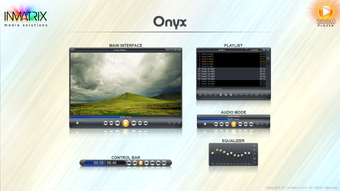
Once installed, launch Zoom Player from the Start menu. The first time you open the application, you’ll be greeted by a brief “Welcome” wizard that helps you set default video and audio devices, choose a preferred skin, and enable the automatic codec lookup feature. After completing the wizard, the main interface appears—a clean window with playback controls at the bottom and a hidden top bar of advanced icons. To reveal the advanced bar, click the cluster of dots in the lower‑right corner; this expands the UI to expose the station manager, skin changer, and media library editor.
Zoom Player is built exclusively for the Windows operating system, supporting Windows 10, Windows 11, and legacy versions back to Windows 7 (64‑bit recommended). The application runs natively on both 32‑bit and 64‑bit environments, though the 64‑bit version provides better memory handling for high‑definition video. While there is no official macOS, Android, or iOS client, Windows users can still enjoy the full feature set, including the Web Remote feature that lets you control playback from any browser on the same network—great for tablets or smartphones as remote controls.
Using the player is intuitive. Drag and drop media files onto the window or add them via the “File → Open” menu. The built‑in playlist editor lets you queue multiple files, reorder tracks, and save custom playlists for later. For streaming, enter a URL in the station manager or browse the built‑in channel list. The equalizer can be accessed from the advanced toolbar, allowing real‑time audio adjustments while watching a movie or listening to music.
Overall, the installation process takes less than five minutes, and the first‑run setup guides even novice users through the essential configuration steps. The only caveat is that the UI icons are minimalist and may require a quick glance at the help files—something the bundled documentation covers comprehensively.
Pros and Cons – What Works and What Could Be Better
Pros
- Automatic codec detection removes the need for third‑party codec packs.
- Highly customizable UI with skins, advanced toolbar, and command‑line support.
- Fast startup and low CPU usage, suitable for older Windows PCs.
- Robust audio tools—including a ten‑band equalizer and DSP effects.
- Professional version adds DRM playback, web remote, and password protection.
- Integrated station manager for internet radio and live TV streaming.
- Extensive playlist and ID3 tag handling for music enthusiasts.
Cons
- The abundance of advanced icons can be confusing for beginners.
- No native macOS, Android, or iOS version limits cross‑platform use.
- Some premium features (DRM, remote control) require an additional purchase.
- Help files are comprehensive but not always easy to navigate quickly.
- Occasional UI lag when loading very large libraries or high‑resolution videos.
We’ve summarized the most common strengths and weaknesses based on real‑world testing. The free version delivers a reliable core experience, while the Professional upgrade is a worthwhile investment for power users who need DRM support and remote control capabilities. The learning curve is the main trade‑off; once you become familiar with the layout, the depth of customization becomes a major advantage.
FAQ and Final Thoughts – Should You Download Zoom Player?
Is Zoom Player completely free?
Zoom Player offers a fully functional free edition. However, several advanced features—such as DRM playback, web remote control, and an extended command‑line interface—are exclusive to the paid Professional version.
What codecs does Zoom Player support out of the box?
The player includes the most common Windows codecs. If a file requires an unknown codec, Zoom Player will prompt you with the exact codec name and a direct download link, streamlining the installation process.
Can I use Zoom Player to stream online radio or TV?
Yes. The built‑in Station Manager lets you add streaming URLs, browse preset radio stations, and even view electronic program guides for supported TV streams.
Is Zoom Player safe to install?
The installer is digitally signed and distributed from the official Zoom Player website. It does not contain adware or unwanted toolbars, making it a secure choice for Windows users.
How does Zoom Player compare to VLC?
VLC focuses on a minimalist, “play‑anything” approach with a limited UI. Zoom Player, by contrast, adds extensive audio/video tweaking, skin customization, and a professional tier for DRM and remote control. If you need deep configuration, Zoom Player is the better fit; for pure simplicity, VLC remains a solid alternative.
In summary, Zoom Player delivers a powerful blend of ease‑of‑use and advanced configuration that few free media players can match. Its automatic codec detection, robust audio tools, and optional Professional upgrades make it suitable for both casual viewers and audiophiles who demand granular control. While the learning curve may deter some newcomers, the comprehensive help files and intuitive drag‑and‑drop workflow quickly offset the initial confusion.
If you’re looking for a Windows media player that can grow with your needs—starting with a clean, free interface and expanding to a full‑featured workstation—Zoom Player is worth a download. Click the button below to get the latest version, and enjoy smooth playback, automatic codec updates, and the freedom to customize every aspect of your media experience.
Download Zoom Player FreeGuides & Tutorials
How to install Zoom Player
- Click the Download button above.
- Once redirected, accept the terms and click Install.
- Wait for the Zoom Player download to finish on your device.
How to use Zoom Player
This software is primarily used for its core features described above. Open the app after installation to explore its capabilities.
User Reviews
No reviews yet. Be the first to share your experience.
You may also like
more
Llama 2
Free-to-use large language model As the new addition to Meta’s arsenal of langua...

NotebookLM
Revolutionizing the note-taking and idea-generation process NotebookLM is an exp...

Github co pilot
AI-inspired software development and coding platform GitHub Copilot is a browser...

Google Gemma
Google’s lightweight AI models Introducing Google Gemma , a family of cutting-ed...

AI Image Enlarger
A free app for Windows, by ai-image-larger. AI Image Enlarger is a free software...

DALL E
AI-driven text-to-image transformation engine DALL·E is a free graphic and desig...